
At APK Guru, one of the most common sources of confusion we see around Android downloads is surprisingly simple: a user expects an APK file but downloads something ending in .xapk or .apkm instead.
The natural question is:
What is the difference between APK vs XAPK vs APKM, and which one should you actually install?
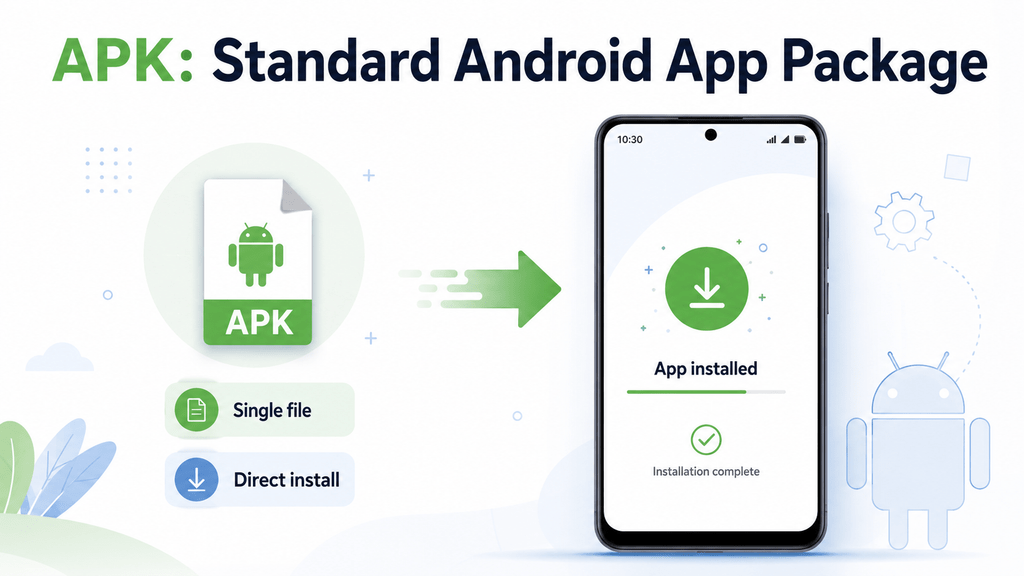
The short answer is that APK is Android’s native installable application package, while XAPK and APKM are third-party container formats commonly used to package split APKs or additional app data together.
Google’s Android documentation confirms that an APK contains the files Android needs to install and run an application. By contrast, Android App Bundles can be divided into a base APK plus additional configuration or feature APKs for a particular device.
That shift toward split APKs is the main reason formats such as XAPK and APKM exist.
This guide explains the formats in plain English, when each one appears, how they are installed, and which one makes the most sense for different users.
Quick Answer: APK vs XAPK vs APKM
If you only need the basic difference, start here.
| Format | What It Is | Installs Directly? | Typical Contents |
|---|---|---|---|
| APK | Android’s standard installable package | Usually yes | App code, resources, manifest |
| XAPK | Third-party ZIP-style container | Usually no | APK(s), OBB data, metadata |
| APKM | APKMirror’s bundle container | Usually no | Base APK + required split APKs |
| AAB | Publishing format for developers/app stores | No | App modules used to generate APKs |
| APKS | Container for multiple split APKs | Requires compatible installer | Base + device-specific splits |
The most important point in APK vs XAPK vs APKM is this:
APK is the actual Android installation format. XAPK and APKM are ways of packaging multiple Android installation components together for distribution.
Why Are There So Many Android Package Formats?
Years ago, Android apps were often distributed as one large APK.
That single file might include:
- Multiple languages
- Resources for several screen sizes
- Libraries for different processors
- All available app features
This worked, but it could make application files unnecessarily large.
Google later introduced the Android App Bundle (AAB) publishing format. Developers can upload one app bundle, and Google Play generates optimized APK files for the specific device downloading the app.
For example, one Android device might receive:
base.apk- ARM64 configuration
- English language resources
- xxhdpi screen resources
Another phone could receive different configuration splits.
Android treats these split APK files together as one installed application.
This is great when Google Play handles installation automatically.
It becomes more complicated when someone wants to distribute the same application outside Google Play.
That is where package containers such as XAPK and APKM become useful.
What Is an APK File?
APK stands for Android Package Kit, although Android documentation generally refers to it simply as an Android package.
A file ending in:
example.apk
contains the components Android needs to install an application.
Google explains that Android SDK tools compile app code, data, and resources into an APK, and Android-powered devices use that APK to install the application.
A typical APK can include:
- Compiled application code
- AndroidManifest.xml
- Images
- Assets
- Libraries
- Certificates
- Resources
- App configuration information
Why APK Is the Simplest Format
With a normal standalone APK, installation is usually straightforward:
- Download the APK.
- Open the file.
- Allow installation from that source if required.
- Tap Install.
Android’s normal package installer understands .apk files.
That is the biggest practical difference when comparing APK vs XAPK vs APKM.
APK generally does not require a dedicated bundle installer.
But Not Every APK Is a “Full APK”
This is where things become more interesting.
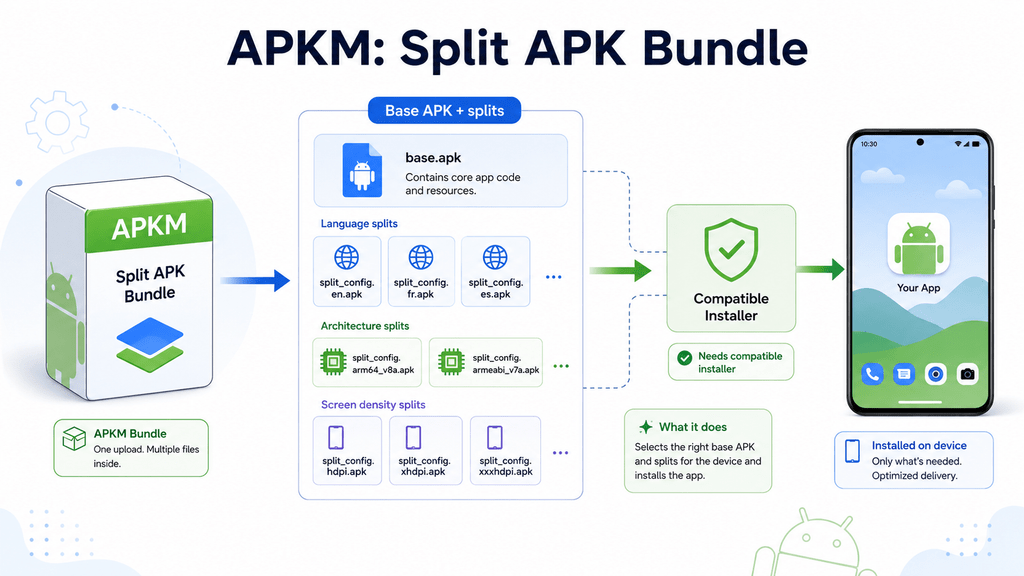
Modern Android applications can use split APKs.
Google’s documentation explains that an app can be delivered as:
- A base APK
- Configuration APKs
- Feature APKs
The base APK contains functionality shared by the other pieces, while configuration APKs can contain resources for a particular language, screen density, or CPU architecture.
If you download only:
base.apk
from an application that depends on several split APKs, installation may fail or the application may not function properly.
Google specifically notes that partial sideloaded installations missing required split APKs fail on Google-certified devices and devices running Android 10 or later.
So even though the file extension says .apk, it may not represent the complete application by itself.
What Is an XAPK File?
An XAPK is not an official Android installation format.
OWASP’s Mobile Application Security documentation describes XAPK as a ZIP-based container used by third-party stores to package one or more APK files together with optional additional data.
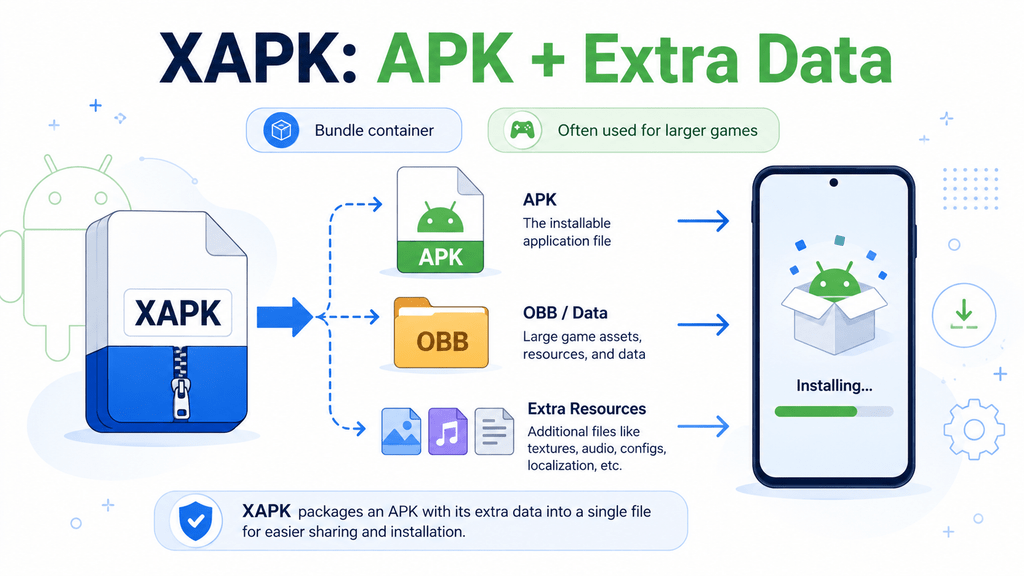
A typical XAPK might contain:
game.xapk
├── base.apk
├── config.arm64_v8a.apk
├── config.en.apk
├── Android/obb/com.example.game/
│   └── main.123.com.example.game.obb
└── manifest.json
That means XAPK can contain several different things.
It may include:
- One standalone APK
- Multiple split APKs
- OBB game data
- Metadata
- An icon
- Package information
That flexibility explains why XAPK is common with larger Android games.
Why Would a Game Use XAPK Instead of APK?
Large games often contain much more than application code.
They may include:
- High-resolution textures
- Audio
- Maps
- Character assets
- Video files
- Other game resources
Traditionally, some of this content could be stored in OBB expansion files.
An XAPK can package the APK and this additional data together so users download one archive rather than manually collecting several files.
OWASP notes that XAPK packages can contain both split APKs and optional OBB data.
So in the difference between APK and XAPK, think of it like this:
APK = the installable Android app package
XAPK = a container that may carry the APK plus additional pieces
Can You Install an XAPK by Tapping It?
Usually not with Android’s standard package installer.
Android normally expects an APK.
Because XAPK is a container rather than Android’s native installable format, you generally need a compatible installer that can:
- Open the XAPK.
- Identify the APK components.
- Install the correct split APKs.
- Place OBB data where needed.
APKMirror’s current installer, for example, supports .xapk files in addition to APKM, APKS, and regular APK files.
Technically experienced users can also extract an XAPK and inspect its contents, but simply renaming .xapk to .apk does not turn it into a normal APK.
What Is an APKM File?
An APKM file is a bundle format created by APKMirror.
APKMirror explains that each .apkm file contains a base APK plus one or more split APK files required for that application release.
For example:
example.apkm
├── base.apk
├── config.arm64_v8a.apk
├── config.xxhdpi.apk
└── config.en.apk
Rather than asking users to separately download each split, APKMirror packages them inside one APKM container.
Their installer can then identify which splits are appropriate for the device.
Why Doesn’t Android Install APKM Directly?
Because .apkm is not Android’s native package extension.
The actual Android components inside it are still APK files.
APKMirror’s documentation explains that split APK releases cannot normally be sideloaded with a single tap like a standalone APK, which is why APKMirror Installer is used for its APKM bundles.
So if you tap an APKM file and Android says it cannot open the file, that does not necessarily mean the download is damaged.
You may simply be trying to open a bundle with the wrong installer.
APKM vs XAPK: Are They Basically the Same?
They solve similar problems but are not identical.
Both are containers used to distribute Android app components.
However:
APKM
- Developed by APKMirror
- Primarily intended to package split APK releases
- Normally installed using APKMirror Installer
- Includes base APK and relevant splits
XAPK
- Broader third-party container format
- Can contain one APK or multiple APKs
- Can also include OBB expansion data
- Can be handled by compatible XAPK/bundle installers
So when comparing APK vs XAPK vs APKM, APKM is best thought of as APKMirror’s specific bundle format, while XAPK is a more general third-party package container.
Where Does AAB Fit Into All This?
You may also see APK vs AAB vs APKM comparisons.
AAB stands for Android App Bundle.
The critical difference is that an AAB is mainly a publishing format, not something ordinary Android users install directly.
Google says an AAB contains an app project’s compiled code and resources but cannot itself be installed on Android devices. A distributor such as Google Play processes the bundle into device-specific APKs.
Think of the workflow like this:
Developer creates AAB → Google Play processes AAB → Google Play generates APKs → Android installs those APKs
Users normally never interact with the AAB directly.
APK vs XAPK vs APKM vs AAB
Here is the clearest comparison.
| Feature | APK | XAPK | APKM | AAB |
|---|---|---|---|---|
| Official Android install format | Yes | No | No | Publishing format |
| Directly installable | Usually | No | No | No |
| Contains APK | It is the APK | Yes | Yes | Generates APKs |
| Can contain split APKs | Individual split files can be APKs | Yes | Yes | Source for splits |
| Can contain OBB | Not normally inside APK | Yes | Usually focused on splits | Uses Play delivery systems |
| Needs special installer | Usually no | Usually yes | Yes | Not user-installed |
| Typical user | Android user | Third-party download user | APKMirror user | Developer/app store |
Which Format Should You Choose?
This is the part many competitor articles skip.
For most users, you usually do not need to choose a format intentionally.
The correct format depends on how the developer or distributor packages the application.
Choose a Normal APK When:
- The publisher provides a standalone APK.
- The app does not require split files.
- You want the simplest manual installation.
- You have verified the source.
This is normally the easiest option.
Use XAPK When:
- The app is distributed as XAPK.
- The package includes OBB data.
- Several split APKs are bundled together.
- You have a compatible installer.
Do not convert XAPK blindly if the archive contains several required files.
Use APKM When:
- You downloaded the application from APKMirror as an APK bundle.
- The release uses multiple split APKs.
- You plan to use APKMirror Installer.
APKM is mainly relevant to APKMirror users.
Do Not Download an AAB Expecting to Install It
AAB is for publishing.
If a random website tells regular users to install an .aab file directly, something is wrong with the instructions.
Why Is My XAPK or APKM Not Installing?
The problem is often not the app itself.
You may simply be using Android’s ordinary APK installer for a package it does not understand.
Common causes include:
Wrong Installer
A normal Android package installer expects .apk.
Use a compatible bundle installer for .xapk or .apkm.
Missing Split APK
If you extracted the bundle manually and installed only base.apk, required resources may be missing.
Wrong CPU Architecture
A split designed for arm64-v8a may not be appropriate for another architecture.
Wrong Screen-Density Split
Some bundles include configuration resources based on device display density.
Incompatible Android Version
The application may require a newer Android release.
Corrupted Download
A partially downloaded bundle can fail to install.
This is why identifying the format should be part of troubleshooting before changing random Android security settings.
Can You Convert XAPK or APKM Into One APK?
Sometimes—but not always.
If an XAPK contains only one standalone APK plus unrelated metadata, extracting that APK may be enough.
But if the XAPK contains:
- Multiple split APKs
- OBB files
- Device-specific configuration APKs
there may be no sensible one-click conversion into a single universal APK.
OWASP specifically notes that when an XAPK contains split APKs, the correct method is to install the base APK together with the matching splits rather than assuming everything can be merged into one universal APK.
The same basic principle applies to APKM bundles.
So “XAPK to APK converter” websites can be misleading if they imply every bundle is simply one APK hidden inside another extension.
Is APK Safer Than XAPK or APKM?
The file extension alone does not determine safety.
A malicious APK is still malicious.
A legitimate XAPK or APKM from a verified source may be perfectly valid.
What changes is the complexity of verification.
With a standalone APK, you only need to inspect one installable package.
With XAPK or APKM, you may be dealing with multiple package components.
Before installing any of them, check:
- Source
- Developer
- Package name
- Version
- Signing information
- Requested permissions
- Android warnings
At APK Guru, we do not consider .apk, .xapk, or .apkm automatically safe simply because the filename looks correct.
Common Misunderstandings
“XAPK Is a Better Version of APK”
Not exactly.
XAPK is mainly a packaging container.
It is not a newer Android replacement for APK.
“APKM Is Android’s Official New Format”
No.
APKM is APKMirror’s own container for distributing split APK releases.
“AAB Replaced APK”
Not on the device.
Google Play commonly accepts AAB uploads from developers, but Android devices still install APK components generated from those bundles.
“I Can Rename XAPK to APK”
Changing the extension does not change what is inside the file.
“Base.apk Is Always Enough”
Not if the application depends on other split APKs.
Google documents split applications as multiple APK components that work together as one application.
A Simple Decision Tree
Downloaded a file and unsure what to do?
File ends in .apk
Try the standard Android installer after verifying the source.
File ends in .xapk
Use a trusted installer that supports XAPK and verify what the archive contains.
File ends in .apkm
Use APKMirror Installer if the file came from APKMirror.
File ends in .apks
Use a compatible split-APK installer.
File ends in .aab
Do not expect normal Android installation. AAB is intended for publishing and processing into APKs.
Why This Matters for Pakistani Android Users
Many Android users in Pakistan download apps manually because an application may:
- Not appear in their Play Store region
- Roll out slowly
- Be distributed directly by its developer
- Be shared as an APK outside Google Play
Mobile-data limits and storage also matter.
Split APK systems can reduce download size because users receive only the resources required for their device. Google specifically highlights smaller optimized downloads as one advantage of the App Bundle model.
But manual bundle installation can be more confusing.
That is why users should first identify the package type rather than treating every Android download as a normal APK.
Frequently Asked Questions
What is the difference between APK and XAPK?
APK is Android’s standard installable package. XAPK is a third-party ZIP-based container that can include one or more APK files together with OBB data and metadata.
What is an APKM file?
APKM is APKMirror’s bundle format containing a base APK and one or more split APKs. APKMirror Installer is designed to install these bundles.
Can Android install XAPK directly?
Normally, Android’s standard installer does not install the XAPK container directly. A compatible bundle installer is usually required.
Can I install APKM without APKMirror Installer?
Technically experienced users may extract and install compatible split APKs using other tools, but APKMirror distributes APKM specifically for use with its installer.
Is XAPK safer than APK?
Not automatically. Safety depends on the source, publisher, package contents, signature, and permissions rather than the extension alone.
What is the difference between APK and AAB?
APK is Android’s installable application format. AAB is a publishing format that app stores process into optimized APKs for devices.
Why does an APKM contain several APK files?
Modern Android applications can use split APKs for different languages, CPU architectures, screen densities, or features. APKM packages these required pieces together.
Should I choose APK or XAPK for a game?
If the developer provides a complete standalone APK, that is normally easier to install. If the game is legitimately distributed as XAPK because it includes additional data or split packages, use the appropriate XAPK installation method instead.
Final Thoughts
The easiest way to understand APK vs XAPK vs APKM is to stop thinking of them as three competing versions of the same Android format.
They play different roles.
APK is Android’s actual installable application package.
XAPK is a third-party container that can package APKs, split APKs, OBB data, and metadata together.
APKM is APKMirror’s bundle format designed mainly for split APK releases.
And AAB sits one step earlier in the process as a developer publishing format that app stores can convert into device-specific APKs.
For ordinary Android users, the safest approach is simple:
Identify the extension first, verify where the file came from, use the installation method designed for that format, and do not try to force every Android package through the standard APK installer.
Once you understand what is actually inside the file, choosing the correct installation method becomes much easier.